


Page 181 - Basics of MATLAB and Beyond
P. 181
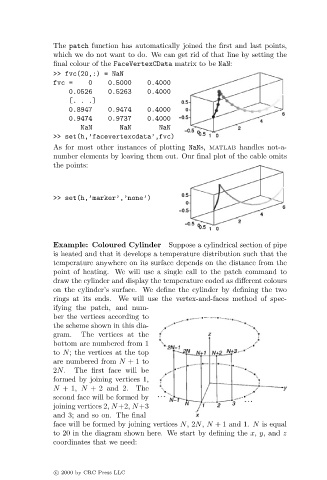
The patch function has automatically joined the first and last points,
                               which we do not want to do. We can get rid of that line by setting the
                               final colour of the FaceVertexCData matrix to be NaN:
                               >> fvc(20,:) = NaN
                               fvc =    0     0.5000    0.4000
                                   0.0526     0.52630.4000
                                   [...]
                                   0.8947     0.9474    0.4000
                                   0.9474     0.9737    0.4000
                                      NaN        NaN       NaN
                               >> set(h,’facevertexcdata’,fvc)
                               As for most other instances of plotting NaNs, matlab handles not-a-
                               number elements by leaving them out. Our final plot of the cable omits
                               the points:


                               >> set(h,’marker’,’none’)


                               Example: Coloured Cylinder     Suppose a cylindrical section of pipe
                               is heated and that it develops a temperature distribution such that the
                               temperature anywhere on its surface depends on the distance from the
                               point of heating. We will use a single call to the patch command to
                               draw the cylinder and display the temperature coded as different colours
                               on the cylinder’s surface. We define the cylinder by defining the two
                               rings at its ends. We will use the vertex-and-faces method of spec-
                               ifying the patch, and num-
                               ber the vertices according to
                               the scheme shown in this dia-
                               gram.  The vertices at the
                               bottom are numbered from 1
                               to N; the vertices at the top
                               are numbered from N +1 to
                               2N.   The first face will be
                               formed by joining vertices 1,
                               N +1, N + 2 and 2.    The
                               second face will be formed by
                               joining vertices 2, N+2, N+3
                               and 3; and so on. The final
                               face will be formed by joining vertices N,2N, N + 1 and 1. N is equal
                               to 20 in the diagram shown here. We start by defining the x, y, and z
                               coordinates that we need:


                               c   2000 by CRC Press LLC

