


Page 303 - Numerical Analysis Using MATLAB and Excel
P. 303
Interpolation with MATLAB


                             V      I
                            -2.000 -0.0330    0.20
                                              0.15
                            -1.975 -0.0326
                                              0.10
                            -1.950 -0.0323    0.05
                            -1.925 -0.0320    0.00
                            -1.900 -0.0316   -0.05
                                                -2  -1  0  1  2  3  4   5
                            -1.875 -0.0313
                            -1.850 -0.0309         A        B
                            -1.825 -0.0306    8   -1.8500 -0.0309266
                            -1.800 -0.0302    9   -1.8250 -0.0305803
                            -1.775 -0.0299
                            -1.750 -0.0295  =VLOOKUP(-1.8375,A2:B282,2) =        -0.030927
                            -1.725 -0.0292  =VLOOKUP(-1.8375,A2:B282,2,TRUE) =   -0.030927
                            -1.700 -0.0288  =VLOOKUP(-1.8375,A2:B282,2,FALSE) =    #N/A
                            -1.675 -0.0285
                            -1.650 -0.0281         A        B
                            -1.625 -0.0277  264    4.5500  0.1484323
                            -1.600 -0.0274  265    4.5750  0.1496775
                            -1.575 -0.0270
                            -1.550 -0.0267  =VLOOKUP(4.5535,A2:B282,2) =         0.1484323
                            -1.525 -0.0263
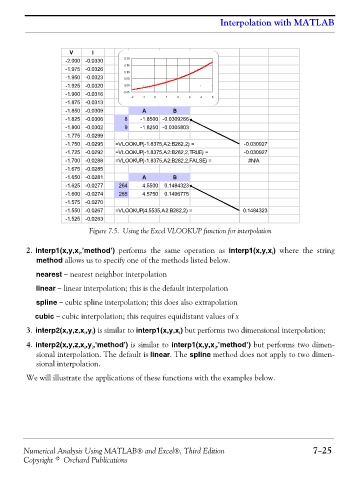
                                   Figure 7.5. Using the Excel VLOOKUP function for interpolation

                2. interp1(x,y,x ,’method’) performs the same operation as  interp1(x,y,x ) where the string
                                i
                                                                                          i
                   method allows us to specify one of the methods listed below.
                   nearest − nearest neighbor interpolation

                   linear − linear interpolation; this is the default interpolation
                   spline − cubic spline interpolation; this does also extrapolation

                   cubic − cubic interpolation; this requires equidistant values of x
                3. interp2(x,y,z,x ,y ) is similar to interp1(x,y,x ) but performs two dimensional interpolation;
                                    i
                                                              i
                                  i
                4. interp2(x,y,z,x ,y ,’method’) is similar to interp1(x,y,x ,’method’) but performs two dimen-
                                                                         i
                                  i
                                    i
                   sional interpolation. The default is linear. The spline method does not apply to two dimen-
                   sional interpolation.
                We will illustrate the applications of these functions with the examples below.


               Numerical Analysis Using MATLAB® and Excel®, Third Edition                             7−25
               Copyright © Orchard Publications

