


Page 304 - Numerical Analysis Using MATLAB and Excel
P. 304
Chapter 7  Finite Differences and Interpolation


                Example 7.10

                The i –  v  (current−voltage) relation of a non−linear electrical device is given by

                                                 it() =  0.1 e (  0.2v t()  – 1 )                      (7.59)

                where   is in volts and   in milliamperes. Compute   for 30 data points of   within the interval
                                       i
                      v
                                                                                         v
                                                                  i
                  2 ≤(  v ≤  5 ) –  , plot   versus   in this range, and using linear interpolation compute   when
                                                                                                     i
                                           v
                                  i
                v =  1.265  volts.
                Solution:
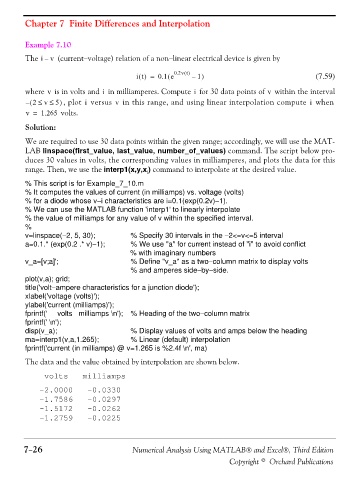
                We are required to use 30 data points within the given range; accordingly, we will use the MAT-
                LAB linspace(first_value, last_value, number_of_values) command. The script below pro-
                duces 30 values in volts, the corresponding values in milliamperes, and plots the data for this
                range. Then, we use the interp1(x,y,x ) command to interpolate at the desired value.
                                                    i

                % This script is for Example_7_10.m
                % It computes the values of current (in milliamps) vs. voltage (volts)
                % for a diode whose v−i characteristics are i=0.1(exp(0.2v)−1).
                % We can use the MATLAB function 'interp1' to linearly interpolate
                % the value of milliamps for any value of v within the specified interval.
                %
                v=linspace(−2, 5, 30);         % Specify 30 intervals in the −2<=v<=5 interval
                a=0.1.* (exp(0.2 .* v)−1);     % We use "a" for current instead of "i" to avoid conflict
                                               % with imaginary numbers
                v_a=[v;a]';                    % Define "v_a" as a two−column matrix to display volts
                                               % and amperes side−by−side.
                plot(v,a); grid;
                title('volt−ampere characteristics for a junction diode');
                xlabel('voltage (volts)');
                ylabel('current (milliamps)');
                fprintf('     volts   milliamps \n');  % Heading of the two−column matrix
                fprintf(' \n');
                disp(v_a);                     % Display values of volts and amps below the heading
                ma=interp1(v,a,1.265);         % Linear (default) interpolation
                fprintf('current (in milliamps) @ v=1.265 is %2.4f \n', ma)
                The data and the value obtained by interpolation are shown below.


                    volts   milliamps
                   -2.0000   -0.0330
                   -1.7586   -0.0297
                   -1.5172   -0.0262
                   -1.2759   -0.0225


               7−26                             Numerical Analysis Using MATLAB® and Excel®, Third Edition
                                                                             Copyright © Orchard Publications

