


Page 153 - Make Your Own PCBs with EAGLE from Schematic Designs to Finished Boards
P. 153
Manual Layout

  In the example layouts thus far, we have made use of the services of the autorouter. It does a pretty
  good job and is certainly much quicker than laying out the board by hand. However, it is a good idea
  to know how to lay out a board manually for a number of reasons:


        • The autorouter cannot always completely lay out a board that a human mind can.

        • For some circuits where the designer (that’s you) wants to keep certain track lengths short and
          thick, a full manual layout usually will yield better results.

        • It’s fun. If you like puzzles, then you will probably enjoy laying out a board by hand. It can be a
          fascinating challenge to lay out a board so that all the tracks are as short and direct as possible
          with a minimum number of vias. This is especially true when it’s a board that the autorouter
          believes to be impossible—it’s you against the machine!


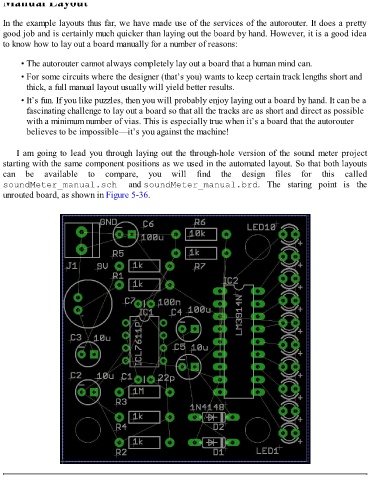
      I am going to lead you through laying out the through-hole version of the sound meter project
  starting with the same component positions as we used in the automated layout. So that both layouts
  can  be  available  to  compare,  you  will  find  the  design  files  for  this  called
  soundMeter_manual.sch  and soundMeter_manual.brd.  The  staring  point  is  the

  unrouted board, as shown in Figure 5-36.


  FIGURE 5-36   Unrouted board.

